

The box arrived yesterday. A CanaKit Raspberry Pi 5, which I left on my desk overnight because I had no time.
This evening, I had some time.
So we set it up.
I say, “we,” because I was not alone. Moss was with me every step of the way. Who’s Moss, you ask? He’s my personal IT technician, powered by Claude.ai. He understands my environment, my rules, and my priorities so I never have to re-explain myself.
Which matters so much more than I can explain in words.
Moss and I joined the headless hunt.
“Headless,” which is the term for setting up a Raspberry Pi without a monitor or keyboard. Just a MacBook, the Raspberry Pi Imager application, and an SSH connection. This is the correct and responsible way to set up a Pi if you are not planning to plug a monitor into it afterward.
It required reflashing on the first attempt.
Why? Because Raspberry Pi Imager silently corrupts passwords that contain special characters. It does not warn you about this. It does not mention it during setup. It just… accepts your password, writes it to the SD card, and wishes you luck.
I had used a special character.
I had to reflash it again, because it didn’t recognize my password. No, I did _not_ forget it. It just didn’t work.
Anyway.
I’d recommend avoiding complex special characters when you first format that SD card. You can always change the password later.
After that, Docker. Then Ollama, for running AI models locally. Then Phi-3 Mini, which is Microsoft’s small language model at 3.8 billion parameters. I selected the model, and asked a question in the terminal.
It responded.
There was a moment, where this felt genuinely impressive. A small credit-card-sized computer on my desk, running an AI model, responding to my questions. I will not pretend the moment wasn’t there.
Then I asked it something factual.
It got the answer wrong. Confidently. Fluently. Completely wrong.
Small models are like this.
They don’t get things wrong in an obvious way. They get things wrong in a very calm, articulate way that requires you to already know the correct answer to catch it. Phi-3 Mini is charming. It is also not useful for anything I would actually want to do.
We connected Open WebUI (a browser-based chat interface that sits on top of Ollama, so I can access the Pi from any device on my home network without SSH) and pointed it at Groq’s free API tier running Llama 3.3 70B instead.
70 billion parameters is more honest company. Not perfect, but better.
Here is where it gets interesting.
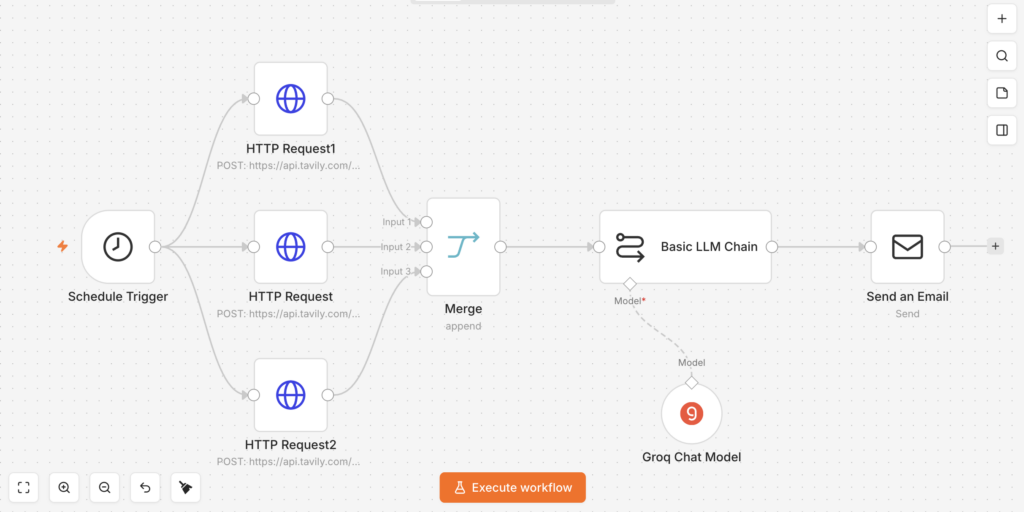
We built a daily AI news briefing pipeline in n8n, which is a self-hosted workflow automation tool. Every morning at 8am, three search queries run in parallel: general AI news, trending GitHub repositories, and AI failures and controversies. The results get passed to Groq for summarization and land in my inbox as a formatted HTML email with seven sections.
Here’s the workflow:
One of the sections is called “AI Gone Wrong.” Because sometimes it does. Moss and I saw this first hand repeatedly today.
Getting Gmail to cooperate with a self-hosted service on a local network is, to be clear, its own separate project. Google OAuth will not redirect to a local IP address (understandably). n8n’s cloud OAuth proxy also did not work. We eventually used Gmail App Passwords via SMTP, which is the solution that makes no one feel good about themselves and also works perfectly.
There is also an unremovable promotional footer that n8n appends to every outgoing email on the free tier.
—
This email was sent automatically with n8n
I see it every morning. We are learning to coexist.
The Pi posts to Slack now.
I set up a Slack workspace as the notification hub for the infrastructure. Watchtower monitors Docker containers for updates and posts results to the #infrastructure channel every morning at 9am.
Watchtower 1.7.1 ships with an internal Docker client stuck at API version 1.25, which is incompatible with Docker v29. If you don’t know about this, it will flood your logs with errors on a two-second loop.
One environment variable fixes it.
I know about it now.
So here is what actually runs every day.
- 8:00am: AI briefing email. GitHub trending repos, open source tooling, model releases, legislation, enterprise AI, community reactions, and a dedicated section for AI systems that have embarrassed themselves or their creators.
- 9:00am: Watchtower check results in Slack.
The Pi handles all of this while I sleep. It is, genuinely, doing its job.
I’m excited to give it more work… another day. It’s past my bedtime.
The honest assessment is that the Pi 5 is excellent infrastructure for always-on lightweight services and workflow orchestration. It is not a local AI powerhouse. For real inference, you need a machine with a real GPU. The Pi knows what it is. More than I can say for Phi-3 Mini.